To secure the SCC APIs, every call additionally requires a valid OAuth2 access token, obtained via the Client Credentials grant. This is on top of, not instead of, the Subscription Key from Step 1.
What SupplyOn Hands Over to the Partner
As part of onboarding, SupplyOn provides the partner with:
- Client ID and Client Secret (credential) — one pair per partner/environment
- Token URL for QAS (test environment)
- Token URL for PRD (production environment)
These values are environment-specific and partner-specific. They are shared individually with each partner during onboarding — they are not published on the public developer portal. If you have not received them yet, request them from your SupplyOn integration contact before going live.
Requesting an Access Token
The partner's system calls the Token URL (QAS or PRD, matching the environment being used) with the Client Credentials grant type, authenticating with the Client ID and Client Secret provided by SupplyOn.
Conceptually, the request:
- Uses the OAuth2
client_credentialsgrant - Authenticates with Client ID + Client Secret
- Is sent to the environment-specific Token URL (QAS or PRD)
Curl request example to retrieve an access token:
curl -X POST \ "SUPPLYON_TOKEN_URL" \ -H "Content-Type: application/x-www-form-urlencoded" \ --data-urlencode "grant_type=client_credentials" \ --data-urlencode "client_id=${YOUR_CLIENT_ID}" \ --data-urlencode "client_secret=${YOUR_CLIENT_SECRET}"
The response contains a Bearer access token to be used for subsequent API calls, e.g.:
{ "access_token": "eyJhbGciOiJSUzI1NiIs...", "token_type": "Bearer", "expires_in": 300 }
Using the Token on API Calls
Every SCC API call must now include both headers:
Ocp-Apim-Subscription-Key: <your-subscription-key>
Authorization: Bearer <access_token>
Requests missing a valid token (expired, malformed, or absent) will be rejected before reaching business processing.
Curl request example to use access token to call SCC API:
curl --location --request POST 'SCC_API_ENDPOINT_URL' \ --header "Authorization: Bearer <access_token>" \ --header 'Ocp-Apim-Subscription-Key: <your-subscription-key>' \ --header 'Content-Type: application/json' \ --data 'xyz......'
Curl request example for the chained calls (combining token API call and backend service call):
curl --location --request POST 'SCC_API_ENDPOINT_URL' \ --header "Authorization: Bearer $(curl -s -X POST "SUPPLYON_TOKEN_URL" \ -H "Content-Type: application/x-www-form-urlencoded" \ -d "grant_type=client_credentials&client_id=<YOUR_CLIENT_ID>&client_secret=<YOUR_CLIENT_SECRET>" \ | jq -r '.access_token')" \ --header 'Content-Type: application/json' \ --header 'Ocp-Apim-Subscription-Key: <your-subscription-key>' \ --data "xyz..."
Token Lifetime – 300 Seconds
- Access tokens are valid for 300 seconds (5 minutes).
- Partners must cache the token and reuse it for calls within its validity window — do not request a new token for every single API call.
- Partners must request a new token proactively before expiry (e.g. refresh once ~80% of the lifetime has elapsed, 15-30 seconds before expiry or on receiving an authentication error) to avoid failed calls due to an expired token.
- There is no refresh token in the Client Credentials flow — when the token expires, simply request a new one the same way (Client ID + Client Secret → Token URL).
Graphical Flow Diagram (incl. Token Retrieval)
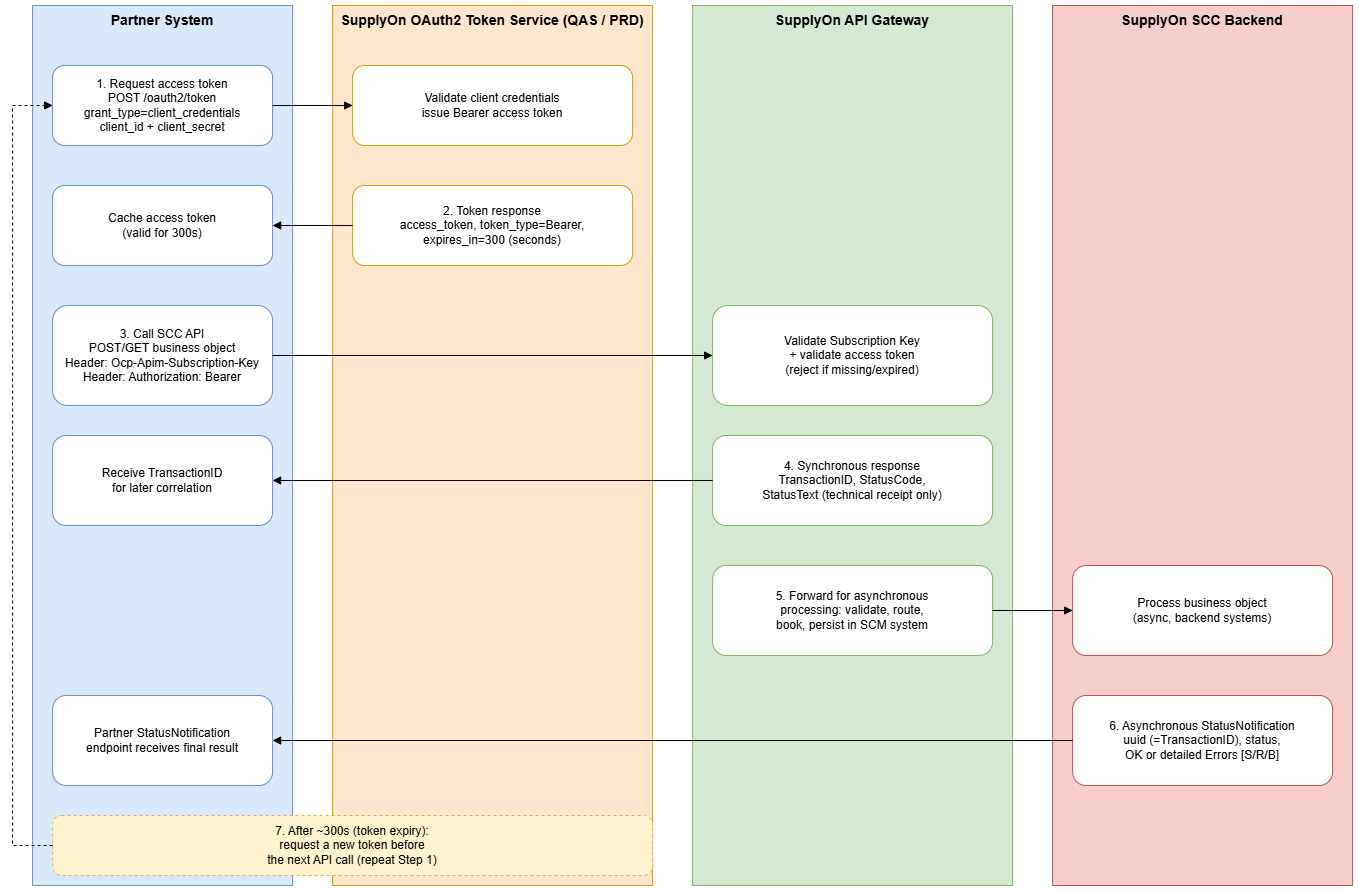
The diagram below visualizes the full flow across four actors: the Partner System, the SupplyOn OAuth2 Token Service ( QAS / PRD ), the SupplyOn API Gateway, and the SupplyOn SCC Backend — including the token retrieval step covered above, its 300-second lifetime, and the synchronous/asynchronous message pattern used by the POST API.
Note: The asynchronous StatusNotification part of this diagram applies to POST APIs only ( see Chapter 5). GET API calls follow a simpler, purely synchronous request/response pattern and are not depicted here.